
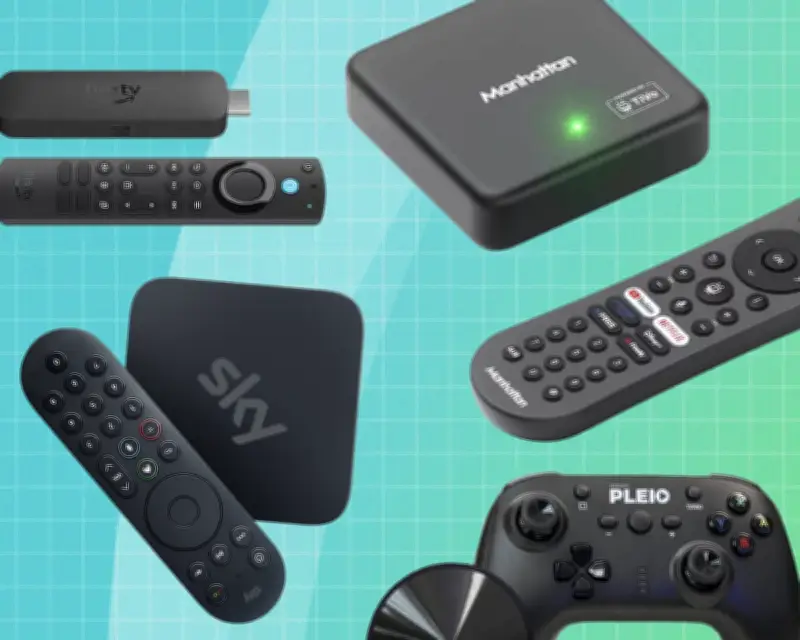
Do you really need a new TV? Simple ways to upgrade your current setup are now available, as TV is changing along with the way we watch it. Forget that dusty aerial or unsightly satellite dish; you can now stream mainstream channels such as the BBC, ITV, and others via Freely, alongside premium services like Sky Atlantic, over Wi-Fi—and it doesn't need to cost the earth.
What is Freely?
Freely comes from the creators of Freeview and Freesat. It is backed by the UK's main public service broadcasters and is supported by a growing list of TV providers. Scroll the Freely programme guide, and you will find familiar channels such as Dave, Yesterday, and W. To watch them, you just need a wireless TV box and Wi-Fi.
Similarly, pay-TV provider Sky is now also available via its plug-and-play streaming box, the Sky Stream. Like Freely, it is easy to set up—just pick your package, be that general entertainment, sports, or movies, and you are good to go.
Moving to wireless TV does not just expand your viewing options; it means you can watch your favourite shows from anywhere in your home.
We put five of the latest cutting-edge wireless TV boxes through their paces, so you can discover the best TV streamer for you.
At a glance
- Best Freely TV streamer: Manhattan Aero £89.99 at Argos
- Best budget wireless TV stick: Amazon Fire 4K Max £69.99 at Amazon
- Best Freely streamer for families: Netgem Pleio £99 at Amazon
- Best premium TV streamer: Sky Stream From £15/mth at Sky
Why you should trust me
I have been reviewing home entertainment technology for decades, testing everything from Blu-ray players and big-screen TVs to hi-fi and home cinema systems. I created and edited the UK's longest-running home cinema magazine, Home Cinema Choice, and now review living room gadgets for a range of review publications.
How I tested
Each device was assessed for performance, features, and ease of use. All five wireless streamers here were tested straight out of the box, with installation, ease of use, and features duly documented. I then sat back and watched TV—lots of it: HD Freely streams, 4K UHD, premium pay TV, even Tipping Point. For this showdown, the boxes were connected to a resident OLED TV to reveal every visual nuance of their picture performance, and a high-end home cinema amplifier to better evaluate their audio output.
The best 4K wireless TV boxes in 2026
Best Freely TV streamer: Manhattan Aero
Price: from £89.99
What we love: A hassle-free way to access Freely
What we don't love: Not ideal if you only use subscription services
Currently the most affordable way to add Freely to any standard TV, the Manhattan Aero is hard to fault. This compact box streams live and on-demand TV over Wi-Fi, with no need for a traditional aerial. It is ideal for placing a TV in a room without conventional connections—a bedroom or conservatory, for instance—or if you simply want to move a screen to the opposite corner of a room where it has been tethered. The Aero has a single HDMI output, plus Ethernet for those who prefer to use a wired connection rather than Wi-Fi. Freely is integrated with the TiVo smart TV platform, which means that, as well as the main channel options, you can also access all the big streaming services, including Netflix, Prime Video, Disney+, and YouTube. TiVo also has its own free ad-supported channels. Installation is straightforward: I was watching Freely TV within a couple of minutes of connecting the box to my Wi-Fi network. You can also pair Bluetooth headphones to the box. Picture quality is excellent, and there is plenty of Ultra HD content available on Netflix and Disney+. Audio is also very good, thanks to Dolby Atmos surround sound support. It also runs the smart TV platform TiVo OS, which comes with all the major streaming apps built in. It is a shame that the Freely channel selection does not match regular Freeview in terms of channel choice, although with more broadcasters signing on, it is only a matter of time before it equals or exceeds its terrestrial counterpart.
Best budget wireless TV stick: Amazon Fire 4K Max
Price: from £69.99
What we love: Fully featured and reliable
What we don't love: Inextricably linked to Amazon Prime
It may look much like previous Fire TV Sticks, but this latest-generation 4K Max edition is Amazon's most powerful to date—with upgrades to processing power and Wi-Fi capabilities. This new HDMI dongle features Wi-Fi 6E, along with twice the storage capacity (16GB) of previous Fire TV Sticks (8GB). It is fast and responsive, with room for plenty of apps to be downloaded. And that, of course, is a primary attraction. Amazon's Fire TV platform offers virtually every major service (Now, Disney+, Netflix, Prime Video, and many more), plus plenty of niche apps covering sports, music, and vintage telly. Usability is slick, too. Simply plug the Fire TV Stick into a spare HDMI port (an extended cable is provided if required), and connect to your Amazon account. The interface is full of curated content and recommendations, but note that there is no built-in Freely. The main catch-up player apps are present, but that is different from having Freely broadcast TV channels ready to browse. On the plus side, gaming support comes courtesy of Xbox integration with Xbox Game Pass via the cloud, and there is Bluetooth pairing for headphone use, too. The downside is heavy advertising and the deep integration with Amazon's retail arm, which can be hard to ignore. What will impress is the quality of 4K streaming and Atmos sound, as well as the opportunity to tweak HDR and frame rate picture settings and customise how Amazon smart widgets appear to your tastes. For sheer bang for the buck, this 4K Max Fire TV Stick takes some beating. It is well specified, offers a class-leading selection of streaming TV apps, and is relatively inexpensive. Picture and sound quality are superb, while Alexa voice control helps ease of use. It is a shame that Amazon charges extra (£2.99 per month) to view Prime Video without ad breaks and get Dolby Vision HDR and Dolby Atmos sound. On the basic plan, you still get 4K HDR and 5.1 audio on free apps such as YouTube, but on Prime Video, streaming is limited to 1080p unless you upgrade.
Best Freely streamer for families: Netgem Pleio
Price: £99
What we love: A great upgrade for your TV, with access to casual gaming
What we don't love: Pointless if you already have a games console
The Pleio is a stand-alone Freely streaming device with a twist: it is not just a TV streamer, it is a gaming platform too, offering about 250 cloud gaming titles. It even comes with a wireless gamepad. It is a small puck-style device with HDMI output, Wi-Fi, and Bluetooth (with headphone pairing). Note that there is no Ethernet port, though, so you cannot connect it to your home network via a wired connection. In addition to the usual Freely channels, the Pleio has a good selection of premium apps, including Netflix, Now, Paramount+, Discovery+, Prime Video, Apple TV, Disney+, and YouTube. There is also a collection of free ad-supported traditional TV channels. My experience of its cloud gaming was rather title-dependent. Simple puzzlers played well, but more demanding action games were laggy. You will need a high-speed connection of at least 25-35Mbps to make the most of it. Do not expect much in the way of top-tier games, either. Note, too, that while the first year of gaming is free, a monthly subscription charge of £9.99 kicks in thereafter. I am not convinced the service is worth that premium. The good news is that the Pleio delivers excellent picture and sound quality. Image quality is sharp and stable, especially with 4K content from BBC iPlayer and other compatible services, while audio is similarly impressive, including stereo and Dolby Atmos. It is a shame that the prospect of a subscription charge one year in for Pleio's cloud games is a bit off-putting. While there is a variety of games available, playability is equally variable, with some games just too laggy to be enjoyable. The puck also tends to be pulled about by any connected cables.
Best premium TV streamer: Sky Stream
Price: From £15/mth at Sky
What we love: Sky's vast library of shows, movies, and sports
What we don't love: Expensive monthly contract
Not all wireless TV streaming options are free. Sky's stand-alone Stream box offers a range of premium pay TV packages, making it a strong alternative to the standard Freely lineup. Compact and unobtrusive, Sky Stream comes with HDMI and Ethernet connectivity and runs on Sky OS—the same platform used by Sky Glass. You can connect the Stream to any TV, and unlike traditional Sky services, there is no need for a satellite dish or Sky broadband, as everything is streamed over the internet. The obvious reason to opt for Sky Stream is the smorgasbord of great content on offer—provided you can afford it. You can pick between a 24-month contract or a rolling 31-day contract. As you would expect, performance is excellent, with ultra-sharp 4K pictures and Dolby Atmos cinema sound. Of course, Sky charges an additional £6 on top of your package price for this. Unlike Sky Q, there is no built-in hard drive for recording. Instead, Sky offers what it calls a cloud PVR, where you add your favourite shows to a playlist, after which they are available to stream either from Sky directly or via a catchup service such as iPlayer. The system generally works fine. When it comes to premium content, Sky is king, and Sky Stream is the neatest, most accessible way to experience its ecosystem. Picture and sound quality are outstanding, and usability is decent, too—but it all comes at a price. The Sky Essentials package is the cheapest tier at £15 a month, but Sky Ultimate TV, at £24 a month, offers better value since it includes Disney+, Netflix, HBO Max, and Hayu. It is a shame that programmes you “record” from the likes of the BBC and ITV play back through their respective catchup apps, which makes the viewing experience a little clunky—unlike Sky's own shows that play directly.
The best of the rest: Humax Aura EZ 4K recorder
Price: from £249
What we love: Great alternative to Sky Q; ability to record TV
What we don't love: You need a TV aerial; no access to big-name streaming apps
Best for: a free TV alternative to Sky Q. The Humax Aura EZ is something of an outlier in the brave new world of streamers, combining modern streaming apps with a built-in 3.5in hard drive for local recordings—much like a traditional set-top box. It features both Freely and Freeview via an aerial. So, when you are watching TV, you view internet-delivered Freely services, but when you want to record content, the box takes you to a menu (actually a Freeview programme guide) with options to record or series link shows via an aerial. Your recordings are then instantly available from the hard drive. This hybrid approach has clear advantages. Record programmes from ITV or Channel 4, and you can fast-forward through the ads, unlike catchup apps with unskippable advertising. The Aura EZ comes with a 2TB hard drive as standard and has three Freeview tuners, which allow up to four recordings at once. To be clear, this Humax box records from aerial-delivered Freeview, not Freely. Elsewhere, the unit itself is well made with a shiny chassis and a full complement of connections, including aerial loop-through, HDMI, and Ethernet ports so that you can hard-wire rather than rely on Wi-Fi. Picture quality is very good, be it HD from Freely or UHD 4K from BBC iPlayer. While there are some apps available, there is no Netflix, Prime Video, or Disney+. You do get the standard collection of Freely catchup services, including BBC iPlayer, ITVX, Channel 4, My5, and so on. The Humax Aura EZ cleverly combines a traditional set-top box with wireless Freely streaming. It pairs a roomy 2TB hard drive and multiple tuners—enough for about 500 hours of HD recordings—with everyday viewing handled via streaming services. It did not make the final cut because operationally, it can be a little temperamental, a consequence of numerous firmware updates after launch. Hopefully, it will settle down as the initial bugs are squashed.
What you need to know
All of our chosen streaming TV boxes deliver content via broadband, rather than a TV aerial or dish, and hence need a robust internet connection. Freely, the wireless TV service from the makers of Freeview, offers several benefits. Most obviously, the lack of tethering means you can access content from anywhere in your home. You also no longer need a standard aerial point to receive channels from the BBC, ITV, Channel 4 and 5, and affiliated broadcasters. Want to put your old telly in the spare room? No problem. Just connect a Freely box, and you can carry on using it. Freely also offers access to a huge library of on-demand content, all of which is subscription-free. But not all Freely boxes are of equal quality. Some offer the service as part of a broader smart TV operating system, coupled to big-name viewing apps, such as Netflix, Prime Video, Apple TV, and Disney+. Others focus on cloud gaming, again streamed via the internet, with no console required. Of course, Freely is not the only wireless TV option in town. Pay-TV provider Sky is throwing a lot of weight behind its Sky OS product family—Sky Glass, Sky Glass Air, and Sky Stream. These offer premium channel viewing (which by default covers most of the channels available from Freely), alongside its own considerable portfolio of entertainment, sports, and movie channels, for a monthly subscription. And then there is Amazon's Fire TV. Again, this does not include Freely, but it comes with an extensive app store built around its own Prime Video service.
What do I need to stream TV?
You will need a fast internet connection to enjoy wireless TV streaming. The minimum recommended speed for Freely is 10Mbps, but if you want a buffering-free binge watch, 20-25Mbps is a more realistic target—especially if you like to watch 4K programmes. If you cannot hit those speeds, you are best sticking with a regular aerial or satellite dish. Not every room in your house will get the strongest Wi-Fi signal, with much depending on the size of your home, the type of construction, and the whereabouts of your router. You will doubtless know if you suffer from Wi-Fi not-spots, rather than hotspots, so factor that into your planning. You can still use these spaces for wireless TV, but you might be better off with a model that offers an Ethernet connection as well as Wi-Fi. Then you can either hard-wire your streaming TV box with an Ethernet cable from the router, or by using a powerline adapter plugged into the mains.
Should you buy a wireless TV streamer?
For all the reasons stated above, a wireless TV streamer is a great investment if you want to prolong the life of TVs you already own, have poor terrestrial reception, or simply want to consolidate the channels you regularly watch with the apps you have subscriptions for. And if you are cutting the cord from a premium service provider but worry you will miss out when a big new movie hits home video, you can always snap it up on disc. For simple (and more affordable) ways to upgrade your current setup, read our guide on whether you really need a new TV.
Steve May is a technology and home entertainment specialist, with more than 30 years' experience writing about TVs, hi-fis, and music. From the biggest, thinnest, brightest TVs in existence to sound systems that rival commercial cinemas, Steve has auditioned them all. When not writing about tech, you will find him bingeing box sets or cataloguing his Blu-ray collection.